Search chess games by opening: names, moves or positions
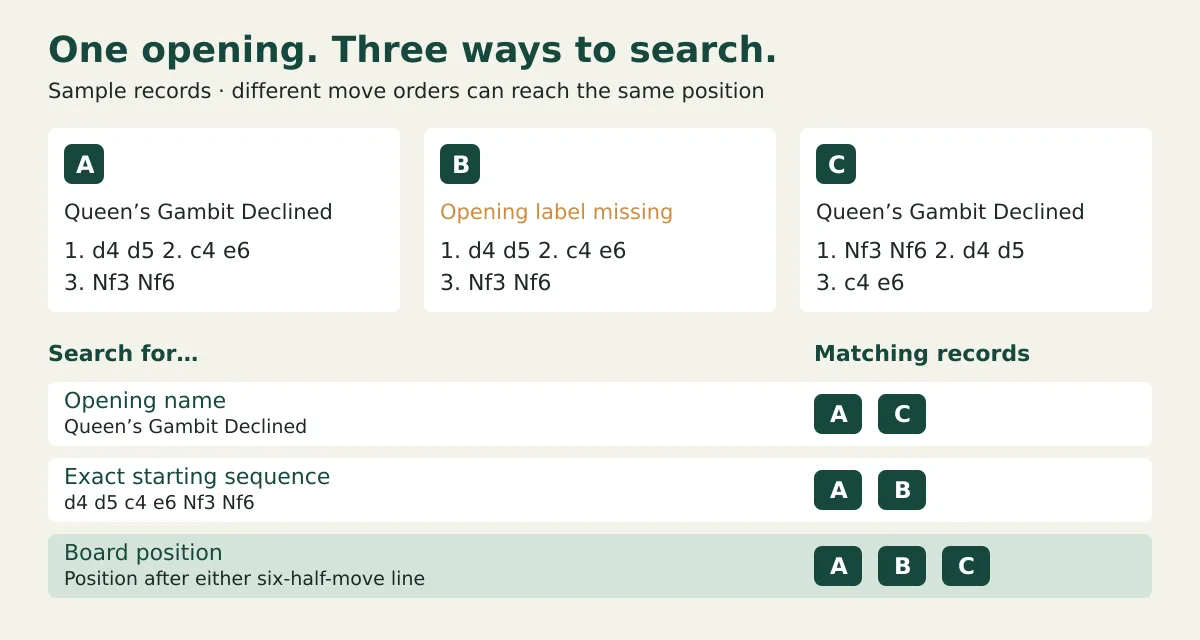
To search chess games by opening, use an opening name or ECO code when your records have those labels, an exact starting-move search when you remember the move order, or a position search when different move orders should count together. Select your own games rather than a masters database. Missing labels and incomplete collections can hide valid matches, so check what the search actually covers before treating its results as all your games in that opening.
How do I search chess games by opening?
Choose the search by what you remember and what you want to include:
- Opening label: use a name or ECO code. Unlabeled games may be missed.
- Starting moves: use the exact first moves. Other move orders are missed.
- Board position: use the setup you reached. This requires a position-search tool.
An ECO code is an opening classification code, such as B20, used to group opening lines. A label search reads that stored classification; it doesn't necessarily inspect the moves. For example, Scid vs. PC’s search help explicitly says an ECO search ignores games without an ECO code.
Start with a broad name if you only remember the opening family. If a variant name returns nothing, try a shorter shared part of the name, then inspect the returned games. When labels are absent or inconsistent, switch to moves or a board position rather than guessing more spellings.
Search your own games on Chess.com
Chess.com’s Game Explorer lets you select your own games and explore the position on the board. Its Explorer instructions describe this route:
- Open Explorer from More, or open an analysis board and select Explore.
- Change the database dropdown from Master Games to My Games.
- Play the opening moves on the board, stopping at the position you want to find.
- Review the games below the move list. Open a candidate to check that it's the game or line you meant.
The navigation guide explains that the move counts and listed games update for the current position and selected database. Leaving the database on Master Games answers a different question: what masters played, rather than what you played.
Explorer isn't a complete account archive. Chess.com says it doesn't index variant or bot games, games shorter than 15 plies, or timeout games shorter than 29 plies. A ply is one player's move: 1. d4 d5 contains two plies. For a very short remembered game, check the source game history instead of relying on Explorer.
Search your own games on Lichess
Use Lichess’s personal opening explorer for your own opening positions, rather than the general Lichess or Masters database. Lichess’s personal-explorer announcement describes position-based results and filters for time control, rated or casual games, and date range.
- Open an analysis board and its opening explorer, using the book control.
- Select the Player view and use the settings cog to check the username and which color you played.
- Play the moves to your target opening position.
- Check the time-control, rated/casual and date settings before inspecting the games.
Lichess indexes personal-explorer games on demand. Its announcement explains that results can stream from the games indexed so far, so allow indexing to finish before treating an early count as the final result.
Player discussions show why the choice of tool matters: people asking for all their games in a specific opening have received conflicting advice about an opening-name field in Advanced Search. The personal explorer is the documented route for exploring your games by the position reached.
Why do move and position searches return different games?
A starting-move search requires the same moves in the same order from the beginning of the game. A position search looks for the board setup instead, so it can find a transposition: the same position reached through a different move order.
Consider three sample records:
- Game A: labeled Queen’s Gambit Declined; begins
1. d4 d5 2. c4 e6 3. Nf3 Nf6. - Game B: has no opening label; begins with the same moves as A.
- Game C: labeled Queen’s Gambit Declined; begins
1. Nf3 Nf6 2. d4 d5 3. c4 e6.
The final board setup and side to move are the same in all three games. The search results differ:
- The stored name Queen’s Gambit Declined finds A and C, but misses unlabeled B.
- The exact starting sequence d4 d5 c4 e6 Nf3 Nf6 finds A and B, but misses C.
- A search for the reached board position can find A, B and C.
Choose the exact sequence to answer “When did I play these opening moves in this order?” Choose the position to answer “When did I reach this setup, however I got there?”
For downloaded collections, a chess database with position search can handle the latter task. Scid vs. PC, for example, documents Current Board → Exact search: it compares every square, though it ignores castling and en-passant rights. Its separate pawn and material searches are broader still, so don't select them when you want the same piece placement.
Search downloaded games from both platforms
A PGN collection can hold games from both Chess.com and Lichess. PGN means Portable Game Notation: a text record of game details and moves. Use the PGN export guide to collect the source files, then search the combined records in a viewer that supports your chosen search type.
Before interpreting a zero-result search:
- Confirm both accounts are included. Different platform usernames can belong in the same collection.
- Check the loaded range. One month of games can't answer a question about last year.
- Remove extra restrictions. A result or date filter may exclude the game even when its opening matches.
- Check move-search eligibility. A custom starting position, unsupported variant or invalid move line may be searchable by its details but not by starting moves.
- Open a returned game. Confirm the relevant moves rather than relying only on its label.
If the game is still on the source but hasn't been collected, follow the old-game retrieval checklist before concluding it is missing.
Plyfolio’s free local PGN search lets you paste copied PGN or choose downloaded files, search supplied opening labels or exact standard-chess starting moves, and replay a match. Files and pasted text stay in the tab, without an upload or account; clear or ordinary reload removes the collection, and the viewer scans up to 1,000 records with a 2 MiB limit per file or paste. Use it for exact starting sequences such as the A/B example above; use a position-search database when you want to include transpositions like C.