How to find old chess games on Chess.com and Lichess
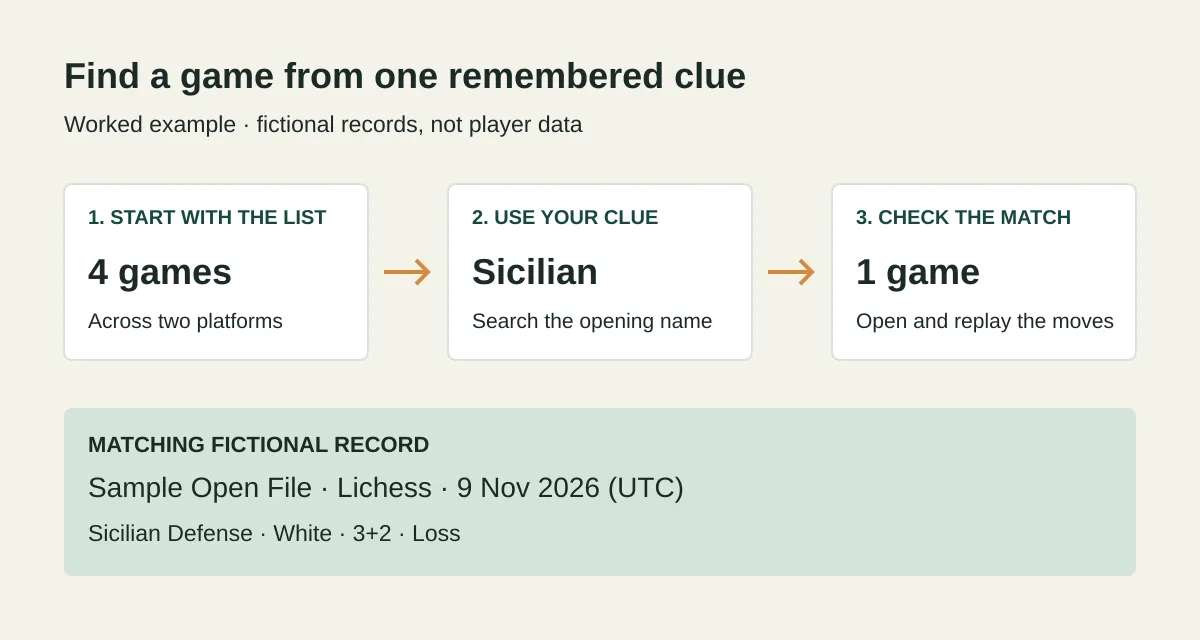
To find old chess games, start with the platform’s game history and the clearest clue you remember: an opponent, an approximate date, or a time control. Add filters one at a time, then replay the likely matches. If you play on both Chess.com and Lichess, check both histories; an empty search on one platform doesn’t rule out a game on the other.
Start with the clue you trust most
You don’t need to remember everything about a game. Begin with one reliable detail and leave uncertain details out of the search.
- Opponent: search the username, then check the date, your color, and the moves.
- Approximate date: use a broad range first, then add time control or result.
- Opening: search the name where supported, or explore the opening moves. Confirm the position you remember.
- Time control: filter the list, then check the date and opponent.
- Distinctive finish: narrow by date or opponent, then replay candidates to confirm the ending.
A time control describes the clock settings. For example, 3+2 means three minutes per player, with two seconds added after each move.
Avoid applying a remembered result too early. A game you remember as a winning position may still have ended in a loss.
How to find old chess games on Chess.com
On the Chess.com website, hover over Play in the left menu and select Game History. Use the search icon and the archive filters to narrow the list, then open a candidate game.
- Choose the relevant game type, such as Live or Daily, if you know it.
- Search the opponent or set a date range.
- Add time control or result only if the first search leaves too many candidates.
- Open a game and check the moves, not just its result.
On the mobile app, Chess.com’s instructions say to scroll to the bottom of the homepage, tap Game Archive, and use the magnifying glass to search.
Chess.com’s game-history help page says archive searches display up to 100 pages of results at a time. If you reach that limit, narrow the date range rather than assuming the older game is missing.
If you remember the opening moves instead of the opponent
Chess.com’s Game Explorer lets you select your own games and play moves on the board to explore matching positions. Use this route when you remember the opening sequence more clearly than the date. Select your own games rather than the master-game database so you’re searching your record.
An opening name is a useful clue, but a position is stronger evidence: different move orders can reach the same position, and a game’s label may be more specific than the name you remember.
How to find old games on Lichess
Use Lichess Advanced Search to narrow games by player and other remembered details. Sign in if prompted; the search page redirected to registration when checked in a signed-out browser for this guide.
Enter your username to keep the search focused on your games. If you remember the opponent, add that username; otherwise start with an approximate period or game mode. Lichess players describe these routes in the discussion about finding past games.
Don’t assume an opening-name filter is available in Advanced Search. The Lichess discussion about filtering by opening distinguishes finding a list by opening name from exploring opening moves. If you can’t search the name, narrow the candidates by player and date, then inspect their opening moves.
What if an old game doesn’t appear?
An empty result means no game matched the current search in the records being searched. It doesn’t, by itself, prove the game no longer exists.
Check these in order:
- Account and source: did you play on the other platform, or under another username?
- Filters: remove the result, opening, and time-control restrictions before abandoning a promising date range.
- Date boundary: widen the range by a day if a game was near midnight. A UTC date may differ from the date on your local clock.
- Coverage: check whether you’re searching a full source archive or only a loaded selection. Changing a date filter doesn’t fetch older records automatically.
- Opening details: try the opponent instead. A missing opening label can prevent a name search from finding an otherwise available game.
Once you find the likely match, replay enough moves to identify the position or finish you remember. Similar opponents, openings, and results can occur more than once.
Try the method across both platforms
Plyfolio is a chess game ledger with a free, unsaved preview that brings available public Chess.com and Lichess games into one searchable list. Search an opponent or available opening name or code, narrow by source, date, result, or time control, and open a game to replay its available moves.
The cover diagram shows this fictional Sicilian search example:
- Begin with four illustrative games across the two platforms.
- Search Sicilian. One game remains: Sample Open File, on Lichess, dated 9 November 2026 in UTC.
- Open that row and replay the moves to check the opening.
These are fictional records, not a real player’s imported history. Try changing the search to Italian to see a different match.
To preview your own public games, enter either or both usernames, or paste each public profile link into its matching field. No email is needed. This is a public-data lookup, not an account connection or proof of username ownership.
The preview starts with up to 200 Chess.com games from the two latest published monthly archives and up to 200 latest finished public Lichess games. For an older game, use Load older archive for one earlier Chess.com month, or Load older Lichess games for up to 200 older records per click. Coverage is bounded, source availability can vary, and opening details may be missing; this is not a full-history import. Paid saving and refresh are not available yet.
Use the loaded date range to decide whether to fetch older games, and the filters to decide which loaded games to inspect.